scrutiny install on UGREEN NAS
Data publicarii: Februarie 2026
NAS
Feb
2026
scrutiny install on UGREEN NAS using Docker and Portainer
scrutiny
is a dashboard for monitoring the health of server/NAS disks based on SMART metrics.smartd is a demon that monitors the Self-Monitorin Analysis and Reporting Technology (SMART). scrutiny integrates smartd daemon.
Starting from the point that we have activated Docker and installed Portainer.
I made this tutorial for my UGREN NAS DXP2800 which has 2 HDD bays and 2 NVMEs.
In my case I used these values:
| /dev/sda | path to volume1/hdd1 |
| /dev/sdb | path to volume1/hdd2 |
| /dev/nvme0 | path to volume2/nvme1 |
| /dev/nvme0 | path to volume2/nvme2 |
| ip_nas | NAS IP address |
Make two folders inside doker folder
volume2/docker/scrutiny
volume2/docker/scrutiny/influxdb
collector.yaml file
collector.yaml
version: 1
host:
id: ""
devices:
# 2 HDD bay UGREEN DXP2800
- device: /dev/sda
type: 'sat'
- device: /dev/sdb
type: 'sat'
# 4 HDD bay UGREEN DXP4800
# - device: /dev/sdc
# type: 'sat'
# - device: /dev/sdd
# type: 'sat'
# 6 HDD bay UGREEN DXP6800
# - device: /dev/sde
# type: 'sat'
# - device: /dev/sdf
# type: 'sat'
# 2 nvme UGREEN DXP2800
- device: /dev/nvme0
type: 'nvme'
- device: /dev/nvme1
type: 'nvme'
host:
id: ""
devices:
# 2 HDD bay UGREEN DXP2800
- device: /dev/sda
type: 'sat'
- device: /dev/sdb
type: 'sat'
# 4 HDD bay UGREEN DXP4800
# - device: /dev/sdc
# type: 'sat'
# - device: /dev/sdd
# type: 'sat'
# 6 HDD bay UGREEN DXP6800
# - device: /dev/sde
# type: 'sat'
# - device: /dev/sdf
# type: 'sat'
# 2 nvme UGREEN DXP2800
- device: /dev/nvme0
type: 'nvme'
- device: /dev/nvme1
type: 'nvme'
Copy this file in /docker/scrutiny folder
Edit this file according to the number of bays contained in the NAS.
Uncomment the desired lines (delete the # character at the beginning of the desired line).
scrutiny.yaml file
Save this file as scrutiny.yaml and copy it to the folder /docker/scrutiny folderPortainer settings
Log in Portainer pagehttp://ip_nas:9000/
Press Live connect
From left vertical menu select Stacks, then press + Add stack"
Create stack page
Name: scrutiny
check Web editor box
Paste file docker-compose.yaml content in Web editor line 1
docker-compose.yaml
services:
scrutiny:
container_name: scrutiny
image: ghcr.io/starosdev/scrutiny:latest
cap_add:
- SYS_RAWIO
- SYS_ADMIN
ports:
- 6090:8080/tcp # webapp
- 8086:8086/tcp # influxDB admin
volumes:
- /run/udev:/run/udev:ro
- /volume2/docker/scrutiny:/opt/scrutiny/config
- /volume2/docker/scrutiny/influxdb:/opt/scrutiny/influxdb
devices:
- /dev/nvme0
- /dev/nvme1
- /dev/sda
- /dev/sdb
# - /dev/usb1
# - /dev/usb2
environment:
- SCRUTINY_WEB_INFLUXDB_TOKEN=ANYLONGSTRING
- SCRUTINY_WEB_INFLUXDB_INIT_USERNAME=A-USERNAME
- SCRUTINY_WEB_INFLUXDB_INIT_PASSWORD=A-PASSWORD
- COLLECTOR_CRON_SCHEDULE=0 23 * * *
security_opt:
- no-new-privileges:true
restart: unless-stopped
scrutiny:
container_name: scrutiny
image: ghcr.io/starosdev/scrutiny:latest
cap_add:
- SYS_RAWIO
- SYS_ADMIN
ports:
- 6090:8080/tcp # webapp
- 8086:8086/tcp # influxDB admin
volumes:
- /run/udev:/run/udev:ro
- /volume2/docker/scrutiny:/opt/scrutiny/config
- /volume2/docker/scrutiny/influxdb:/opt/scrutiny/influxdb
devices:
- /dev/nvme0
- /dev/nvme1
- /dev/sda
- /dev/sdb
# - /dev/usb1
# - /dev/usb2
environment:
- SCRUTINY_WEB_INFLUXDB_TOKEN=ANYLONGSTRING
- SCRUTINY_WEB_INFLUXDB_INIT_USERNAME=A-USERNAME
- SCRUTINY_WEB_INFLUXDB_INIT_PASSWORD=A-PASSWORD
- COLLECTOR_CRON_SCHEDULE=0 23 * * *
security_opt:
- no-new-privileges:true
restart: unless-stopped
Press Deploy the stack
Wait success message (top right corner of the page)
Check scrutiny
Visit scrutiny page http://ip_nas:6090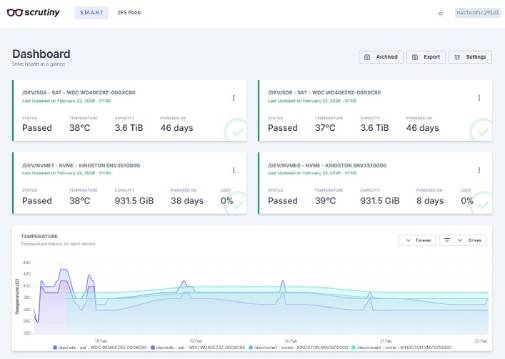

20 Aug 2026 11:15 AM
Copyright © 2005-2026
Termeni si conditii